Earn Cards and Open the Card Shop
Challenges provide two routes to cards: card rewards during a set and Token purchases in the shop after completing it.
- Enter an available CHALLENGE and work through its goals.
- Check the reward notifications after clearing a goal. Overgrowth is one possible card reward that has appeared after a second-goal clear; it is not a guaranteed second-goal drop.
- Finish all three goals, including the final Boss. Completing the set opens the Card Shop.
Each SELL uses a challenge attempt, so build up your cells before spending a try. If a Boss restriction is stopping your progress, use the challenge and Boss guide for the full goal-by-goal process.
Buy, Reroll or Keep Your Tokens
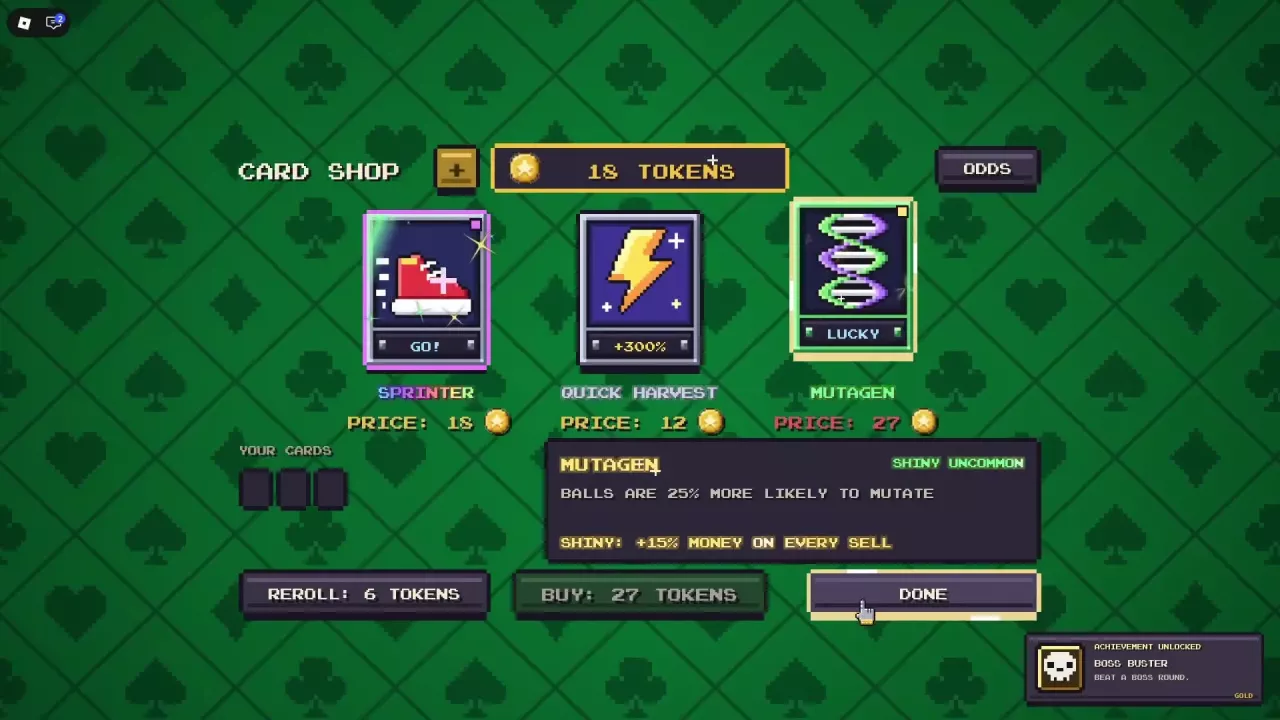
The Card Shop uses Tokens. Open an offer's details, read its effect and price, then compare the price with your balance at the top before choosing BUY.
The shop pictured here has these offers and refresh cost:
| Offer or action | Token cost |
|---|---|
| Sprinter | 18 |
| Quick Harvest | 12 |
| Shiny Uncommon Mutagen | 27 |
| REROLL | 6 |
Treat these as the prices for this shop selection; check your own offers before spending.
The Shiny Mutagen offer makes balls 25% more likely to mutate, with an additional 15% money on every sale from its Shiny bonus. That makes it a useful target when you want more mutations. For other effects and cash-focused choices, see the card list and comparison.
With 18 Tokens, you can afford the listed Sprinter or Quick Harvest, but you are 9 Tokens short of the 27-Token Mutagen. If Mutagen is your goal, keep saving. Spending 6 Tokens on a reroll would leave 12 and replace the offers, pushing that purchase farther away.
Use the remaining shop controls according to your goal:
- REROLL: Spend the displayed Token cost to request different offers. Use it when you want a different selection and can spare the refresh cost.
- ODDS: Open the shop's odds information.
- YOUR CARDS: Check the cards you already have before deciding what to buy.
- DONE: Finish shopping, including when you choose to keep your Tokens.
For ways to build your balance and weigh card spending against skills, see the Token guide.
Arrange Cards from Left to Right
- Open MY CARDS.
- Select your cards to read their effects.
- Drag a card into the position where you want it to act.
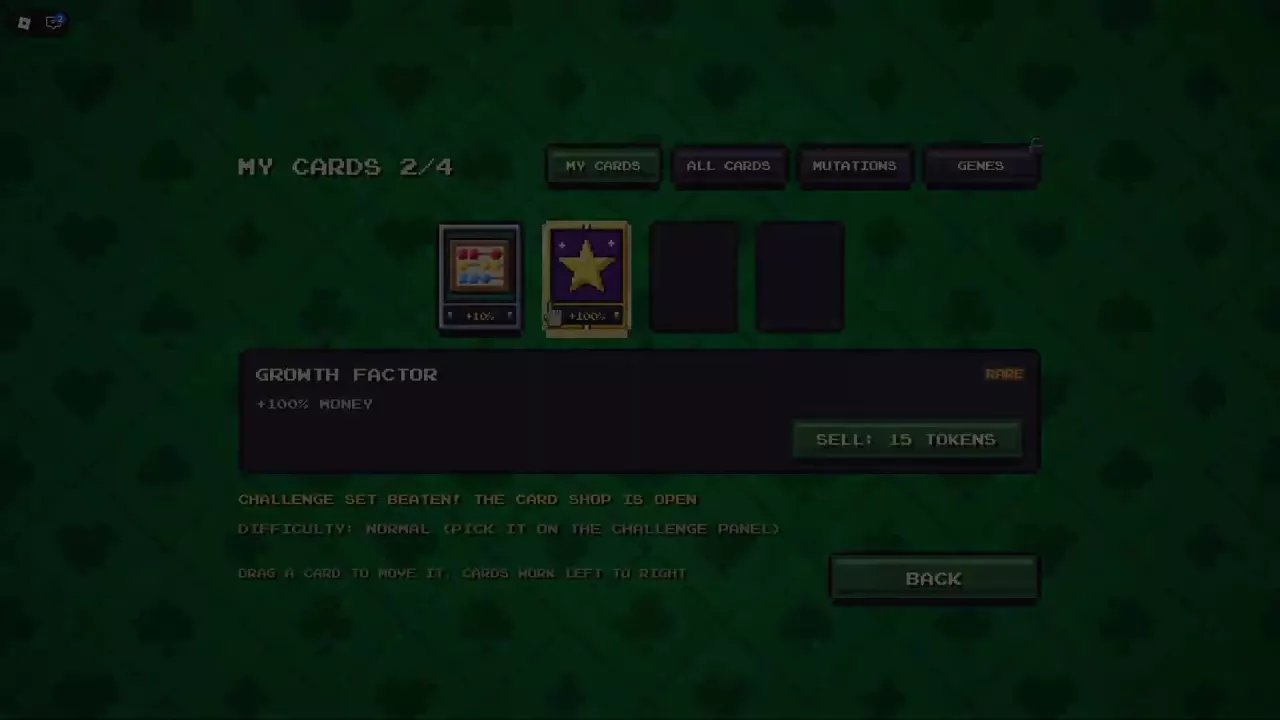
Cards work from left to right. Place a card farther left when you want its effect to occur earlier in the sequence, and base your arrangement on the effects of the cards you actually have.
A counter such as 2/4 means two cards out of the four slots available in that setup. Read your own counter to check your capacity.
The menu also includes ALL CARDS for browsing, alongside MUTATIONS and a GENES tab that may be locked.
Inspect a Card's SELL Value
Open MY CARDS and select a card to find its SELL option in the details panel. For Growth Factor, the panel lists Rare, +100% MONEY, and SELL: 15 TOKENS.
The 15 Tokens are the offered sale value. Opening the details or reading that amount does not sell the card; SELL is the action to initiate the sale.
Before choosing it, weigh the Token payout against the card's role in your setup. Growth Factor's +100% money effect makes keeping it a sensible choice when direct cash income is your priority.
Understand the Extra Slot Options
The Extra Card Slot game pass grants one permanent additional card slot in card runs. If that is the benefit you want, compare it with the other game passes and bundles.
The skill tree also contains a Slot 4 node. Purchase Auto-Split, then look directly below it for Slot 4, priced at 30 Tokens. The Auto-Split and starting skills guide explains how to reach this branch.
For the skill-tree option, inspect the node's description before spending.