

Open Leaderboards and Select a Tab
- Open Leaderboards.
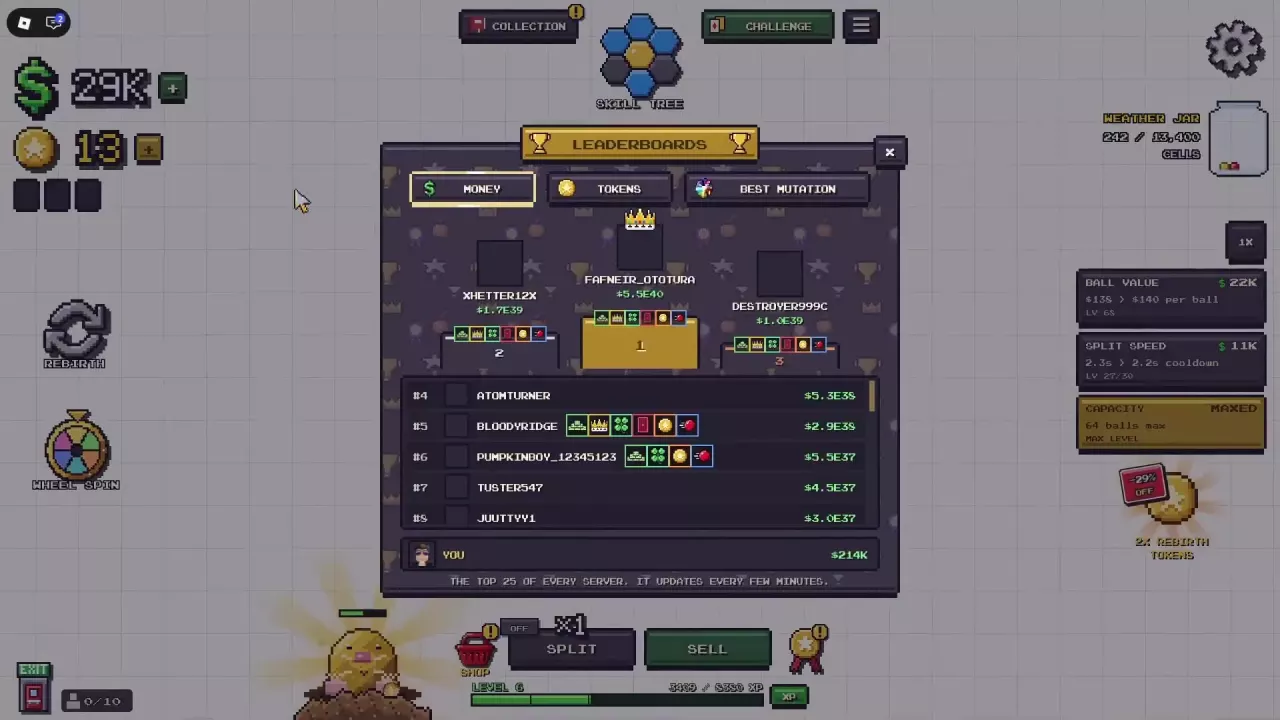
- Select Money, Tokens or Best Mutation across the top of the panel.
- Compare the selected category’s entries with your own value in the YOU row beneath the list.
For ways to earn and use the currencies, see the money guide and Token sources and spending guide.
Read the List and Your Personal Value
The panel lists 25 leading players. The first three places appear on a podium, with the remaining positions in a scrollable list below. Your YOU row sits separately at the bottom, so you can find your displayed value without searching for your name among the leaders.
The standings refresh every few minutes. After making progress, allow time for the next refresh before checking for a change.
Inspect Your Best Ball Separately
To inspect your ball’s composition, open MUTATIONS and look at YOUR BEST BALL. Read VALUE for its value mutations, TRAITS for its traits, and PAYS for the whole ball’s displayed payout multiplier.
Use this preview to understand the combination you have collected. For help interpreting the entries, see the fusion combinations guide.